NewAdvanced OCO

Aegis Pro

Pick what you can lose. Press Buy. It handles the rest.

The free trade panel for Vest Markets. It works out your size, puts in your stop and take profits (TPs) with the trade, and guards it while you’re in. Or set an OCO, and it enters for you at your levels.

FreeTakes about a minuteMade for Vest Markets

  • Size worked out for you
  • A stop on every trade
  • TPs in with the trade
  • Break-even in one press
  • It follows your run-up
  • Advanced OCO entries
  • Saved OCO strategies
  • One switch: ARMED or DISARMED
  • Your risk kept on a slipped fill
  • Daily loss limit
  • Night and day
  • Practice with fake money

How it works

Three moves. Then it keeps watch.

  1. 1

    Pick your amount

    Tap one of your four amounts, or press Other. It’s the most you’re OK to lose, fees included. The size is worked out for you.

  2. 2

    Press Buy or Sell

    You see the lines on the chart first. Press, and your stop and TPs go in with the trade, at the same time.

  3. 3

    It guards the trade

    At TP 1 it takes profit and moves your stop to break-even, plus fees. Then it follows the price with the rest.

New in Aegis Pro

Set the trade before it happens.

Advanced OCO

Buy above, sell below. One cancels the other.

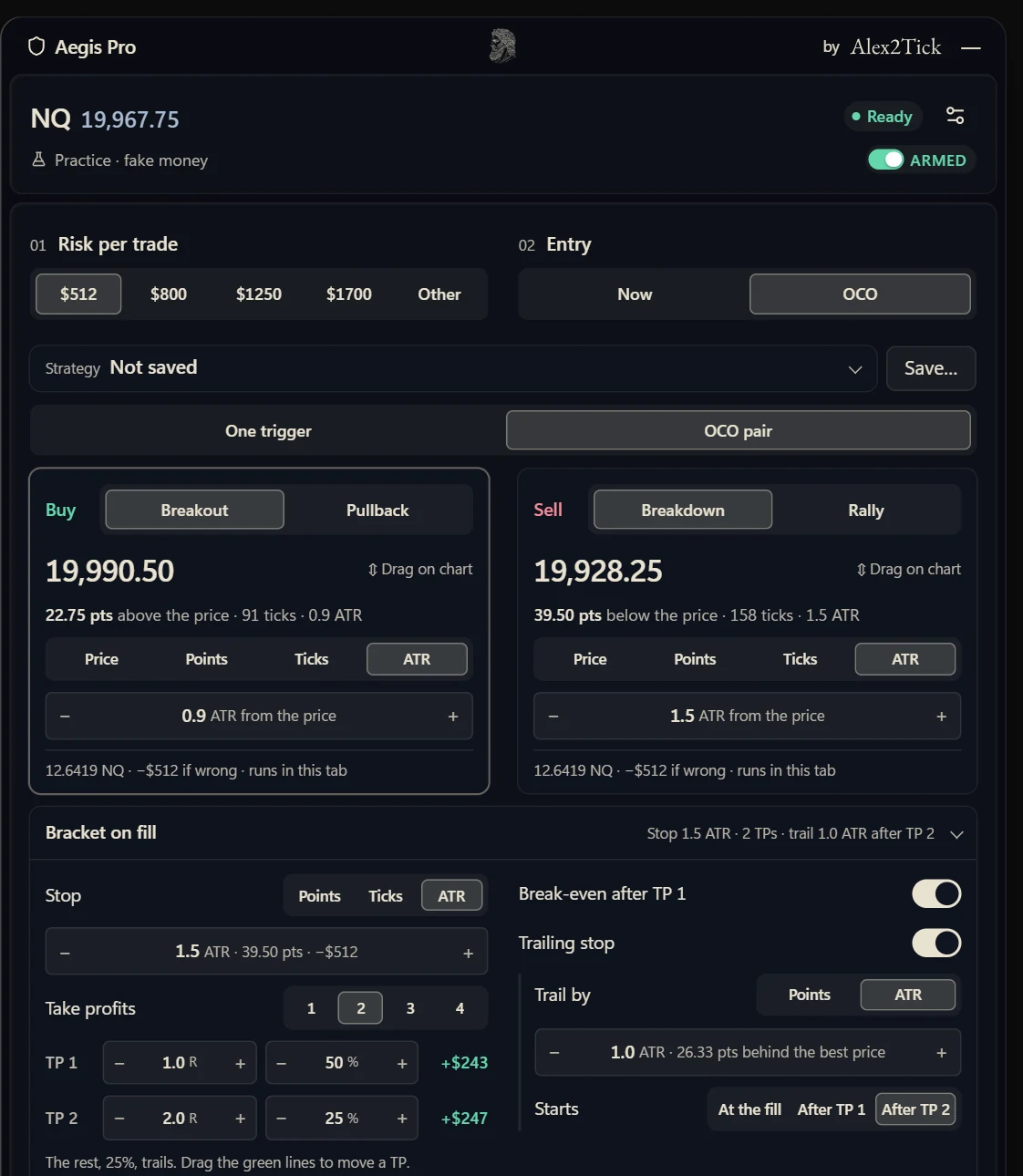
Set One trigger or an OCO pair. Each side is a Breakout or a Pullback (a Breakdown or a Rally when you sell), set in price, points, ticks or ATR, or dragged on the chart. Check the whole OCO, then Activate. When the price gets there, that side buys or sells at market with its stop and TPs, and the other side is cancelled.

Time in force: GTC, 15 minutes or 1 hour. The OCO runs in your Vest tab, so keep the tab open while it waits.
Your exit

Your exit, your way

One to four TPs, and how much each one takes. Break-even after TP 1, on or off. In an OCO’s bracket on fill, the stop by points, ticks or ATR, and a trailing stop by points or ATR that starts at the fill, after TP 1 or after TP 2.

  • Points
  • Ticks
  • ATR
  • TP 1 to 4
  • Trail

Slipped fill

A slipped fill keeps your risk

Fills can land worse than planned. When one does, the stop moves by the same distance, so the trade risks what you set. The panel says by how much. You can switch it off.

Layout

Slim to trade. Wide to set an OCO.

While you trade, the panel is one slim column. Pick OCO and it spreads into two columns when your screen has the room, instead of running off the bottom: the buy and sell sides next to each other, the bracket on fill below. It grows to the left, away from the price, and slides back when you’re done.

The OCO builder in two columns: Risk per trade and Entry across the top, the saved strategy, One trigger or OCO pair, the buy and sell sides next to each other, and the bracket on fill below them.

Look

Night and day

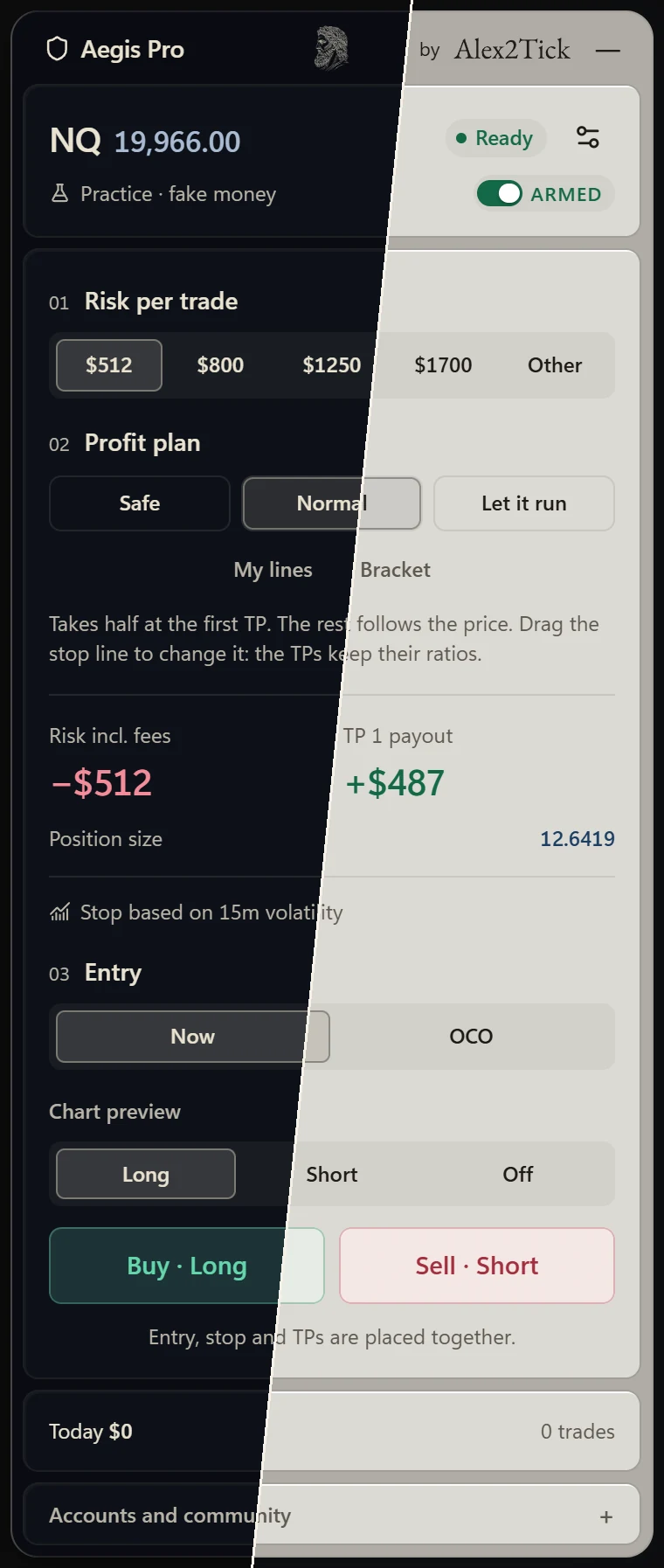
Both looks, down to every menu. Four text sizes. Hide your amounts when you stream.

The Aegis Pro panel split on a diagonal: the Night look on the left, the Day look on the right, at the same moment, with $512 picked and ARMED at the top.

Strategies

Save your setups

Built an OCO you use often? Save it under a name. Open it again from the list, edit it, save over it or delete it. Up to 20 of your own, and four to start from: Range breakout, Fade the range, Buy the pullback and Sell the rally.

One switch

ARMED or DISARMED

The switch at the top turns the whole tool on and off. Disarmed, Aegis sends nothing: no orders, no stop moves, no OCO triggers. In a trade it asks first, and your trade stays on Vest with its stop and TPs.

One trade, start to finish

You press once. It does the rest.

  1. See it first

    Before you press anything, the lines show on the chart: red where you get out, green where you take profit, each with what it’s worth.

  2. Press Buy

    The stop and the TPs go in with the trade. The panel lists what happens next.

  3. TP 1 fills

    Profit comes off. Your stop moves to break-even, plus fees, and the panel tells you what the trade keeps at least.

  4. It follows the run-up

    The stop follows the price, one step behind. It only ever moves your way.

  5. It turns, you keep most of it

    When the price turns, the stop takes you out with what it kept.

Daily protection

Guard the whole day.

Optional. Set them once in Settings and the panel holds you to them. All of them start off.

  • Daily loss limitReach it and the panel locks until tomorrow.
  • Break after a loss30 seconds, 1 or 5 minutes before the next trade.
  • Close my trade at the loss limitIf an open trade takes you to the limit, it closes it.
  • Daily trade limit3, 5 or 10 trades. Then Buy and Sell switch off.
  • Close before the weekend lockAn open trade closes 5 minutes before Vest’s weekend lock for its market.

Built to protect, not to promise.

  • You stay in charge

    It only trades when you say: you press Buy or Sell, or you activate an OCO. Until you turn on Live order execution, it only watches and warns you, and one switch at the top stops everything.

  • A stop on every trade

    If your stop ever goes missing, the panel warns you in red and puts it back.

  • Your trading stays with you

    Nothing about your trading leaves your computer. Only your key and a random device ID are sent, to check the key.

  • Honest about the risk

    Your amount is the plan, not a promise. In a fast market a stop can fill past its price.

Free. No card, no payment.

Get it free in five steps.

That is all I ask. It takes about a minute.

  1. Follow me on X

    Press Follow on my X page.

    Open my X page, @Alex2Tick

  2. Like my post on X

    Open the post

  3. Repost it

    Press the two arrows under the post, then Repost.

  4. Reply TICK

    Write the word TICK as a reply under the post. Nothing else needed.

  5. Send me your X name and email

    Use the form. Your key and the download come to you by email.

Send me my key

I use these to check your post, send your key and email you updates to the tool. Say stop any time. Privacy

After your key arrives

How to install it, step by step
  1. Click the download link in my email. You get one file that ends in .zip.
  2. Unzip it. On Windows: right-click the file, choose Extract All, then Extract. On a Mac: double-click it. Keep the folder somewhere safe, like Documents: Chrome runs the tool from it.
  3. Copy this into Chrome’s address bar and press Enter: chrome://extensions
  4. Turn on Developer mode, the switch in the top right corner.
  5. Click Load unpacked, pick the folder from step 2, then Select Folder.
  6. Pin the green shield: click the puzzle piece at the top right of Chrome, then the pin next to Aegis Pro.
  7. Open Vest. A box asks for your key. Paste the key from my email and it unlocks by itself.
  8. The panel starts by only watching. To let it place your trades, open its settings (the sliders at its top right) and turn on Live order execution. The switch at the top must say ARMED.

Questions

Lost your key?

Type the email your key went to. Your key goes to that address again, with the latest download.

Can I try it before I ask for a key?

Yes. Open the practice: the real tool, with fake prices and fake money, in your browser.

Is it really free?

Yes. Follow me, like, repost, reply TICK and send your email. That is all.

Does it trade for me?

Only when you say. You press Buy or Sell, or you activate an OCO that buys or sells at market when the price reaches its level. After that it moves your stop and takes profit at your TPs, the way you picked. Until you turn on Live order execution, it only watches and warns you. DISARMED, it sends nothing at all.

Can I lose more than my amount?

Yes, it can happen. In a fast market a stop can fill past its price. Your amount is the plan, not a promise.

Do I need a Vest account?

Yes. It works on Vest’s trade page. The practice mode works without one.

No account yet? Code TICK takes 5 percent off. Check that Vest’s terms let you trade from where you live first.

Affiliate link: I earn a commission if you join through it.

Vest Markets, with my link

Is my data safe?

Nothing about your trading leaves your computer. The only things the tool sends are your key and a random device ID, to check the key. Read the privacy page.

Does it work on my phone?

No. It needs Google Chrome on a computer.

What if I close the laptop during a trade?

Your stop and TPs sit on Vest, so they still work. Moving the stop and the daily limits wait until you’re back, and an active OCO does not trigger. Keep the Vest tab open and the computer awake while you’re in a trade.

Trade with a shield.

Free. It takes about a minute to ask for your key.

Trading involves risk, and you can lose money. Not financial advice. You are responsible for every order you place. Aegis Pro is an independent tool, not made or endorsed by Vest Markets.